
The hiring process has changed significantly. Many employers now use video interviews and online assessments to screen candidates before inviting them to the next stage. Instead of walking into an office for the first conversation, job seekers are often asked to record answers, join live video calls, complete skill tests, or take personality and situational judgment assessments online.
This shift has made Interview Preparation more important than ever. It is no longer enough to prepare only for common interview questions. Candidates must also know how to present themselves on camera, manage technology, communicate clearly through a screen, and complete online assessments with confidence.
Whether you are applying for your first job, switching careers, or preparing for a senior role, understanding how video interviews and online assessments work can help you stand out from other applicants.
What Are Video Interviews?
A video interview is an interview conducted through a digital platform. It may be live or pre-recorded.
In a live video interview, you meet with the recruiter or hiring manager in real time using platforms such as Zoom, Google Meet, Microsoft Teams, or another interview tool.
In a pre-recorded video interview, you receive questions on screen and record your answers within a set time. The employer reviews your responses later.
Both formats are used to evaluate your communication skills, confidence, professionalism, and suitability for the role.
See also: Modern Kitchen Renovation Ideas That Add Real Value
What Are Online Assessments?
Online assessments are tests employers use to measure your skills, personality, judgment, or job readiness. They help hiring teams compare candidates more objectively.
Common types of online assessments include:
- Cognitive ability tests
- Personality assessments
- Situational judgment tests
- Typing or data entry tests
- Technical skill tests
- Writing tests
- Numerical reasoning tests
- Verbal reasoning tests
- Job simulation exercises
- Coding or software tests
The type of assessment depends on the role. For example, a customer service role may include a situational judgment test, while a software development role may include a coding challenge.
Why Interview Preparation Matters
Video interviews and online assessments can feel less personal than traditional interviews, but they are just as important. In many cases, they decide whether you move forward in the hiring process.
Good Interview Preparation helps you:
- Reduce nervousness
- Avoid technical problems
- Answer questions clearly
- Present yourself professionally
- Understand the role better
- Perform well under timed conditions
- Show confidence on camera
- Improve your chances of getting shortlisted
Preparation gives you control. Even if you cannot predict every question or test, you can prepare your environment, mindset, answers, and tools.
Research the Company and Role
Before any interview or assessment, study the company carefully. Employers want to see that you understand who they are and why you want the role.
Research:
- The company’s products or services
- Its mission and values
- Recent news or achievements
- The job description
- Required skills
- Key responsibilities
- The company culture
- Industry challenges
Read the job description more than once. Highlight the skills, tools, and responsibilities mentioned. These details will guide your answers during the interview.
For example, if the job description emphasizes teamwork, communication, and problem-solving, prepare stories that show those qualities.
Prepare Your Interview Answers
Most video interviews include common questions. Prepare answers in advance, but do not memorize them word-for-word. You want to sound natural, not robotic.
Common video interview questions include:
“Tell me about yourself.”
Focus on your professional background, relevant skills, and why you are interested in the role.
Example:
“I am a customer support professional with three years of experience helping clients resolve issues through email, phone, and live chat. I enjoy improving customer experiences and solving problems quickly. In my previous role, I helped reduce response time by organizing support templates and improving follow-up processes. I am interested in this position because it matches my communication skills and customer-focused experience.”
“Why do you want this job?”
Connect your interest to the role, company, and your career goals.
“What are your strengths?”
Choose strengths that match the job. Support each strength with a short example.
“Tell me about a challenge you faced.”
Use a clear story. Explain the situation, what you did, and the result.
“Why should we hire you?”
Summarize your most relevant skills, experience, and value.
Use the STAR Method
The STAR method helps you answer behavioral interview questions clearly.
STAR means:
Situation: What was happening?
Task: What were you responsible for?
Action: What did you do?
Result: What happened because of your action?
Example:
“In my previous role, our team was receiving many customer complaints about delayed responses. I was asked to help improve the support process. I created email templates for common issues and organized inquiries by urgency. As a result, we responded faster and reduced repeat complaints.”
This method keeps your answers structured and professional.
Practice Speaking on Camera
Speaking on camera can feel uncomfortable at first. The best way to improve is to practice.
Record yourself answering common questions and review the video. Check your:
- Eye contact
- Voice clarity
- Facial expression
- Body language
- Speaking speed
- Background
- Lighting
- Confidence
You do not need to look perfect. You need to look prepared, calm, and professional.
When speaking, look at the camera instead of constantly looking at your own image. This creates the feeling of eye contact.
Set Up a Professional Interview Space
Your environment affects how the interviewer sees you. Choose a quiet, clean, and well-lit space.
Before the interview:
- Remove distractions from your background
- Sit facing natural light or a soft lamp
- Keep your camera at eye level
- Use a stable chair and desk
- Turn off TV, music, and notifications
- Inform people around you not to interrupt
- Keep your phone silent
- Have a notebook and pen nearby
A simple background is best. Avoid messy rooms, loud patterns, or anything that may distract from your face and voice.
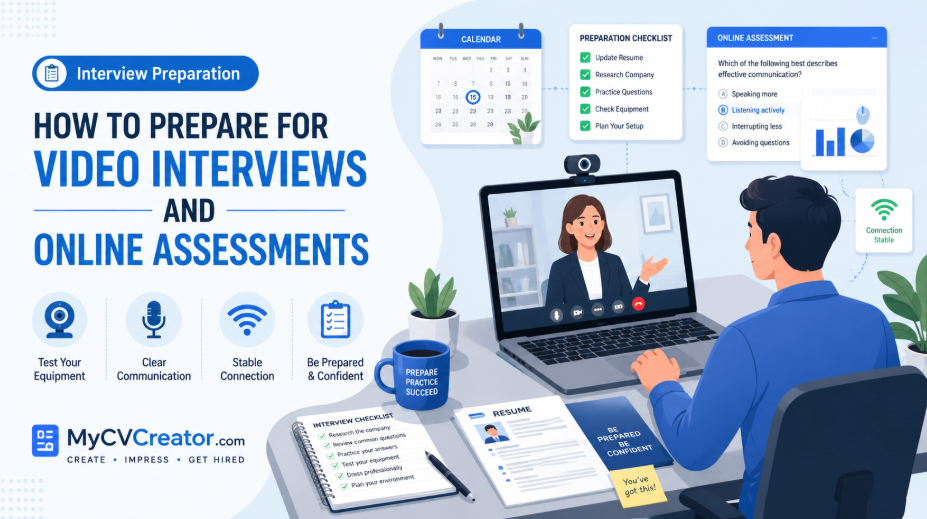
Test Your Technology
Technology problems can affect your confidence and create a poor impression. Test everything before the interview.
Check:
- Internet connection
- Laptop or phone battery
- Camera
- Microphone
- Speaker or headphones
- Interview platform
- Login details
- Browser compatibility
- Lighting
- Screen sharing, if needed
Join the meeting a few minutes early. This gives you time to fix small issues before the interview begins.
For pre-recorded interviews, read all instructions carefully before starting. Some platforms allow practice questions, while others do not.
Dress Professionally
Even though the interview is online, dress as you would for an in-person interview. Your outfit should match the company and role.
For corporate roles, wear business or smart professional clothing. For creative or startup roles, smart casual may be acceptable.
Avoid clothes with distracting patterns, bright glare, or text. Choose something clean, neat, and professional.
Dressing well also improves your mindset. It helps you feel more prepared and confident.
Manage Your Body Language
Body language matters on video. Since the interviewer sees only part of you, small details become more noticeable.
Good video interview body language includes:
- Sitting upright
- Looking at the camera
- Smiling naturally
- Nodding when listening
- Keeping your hands calm
- Avoiding unnecessary movement
- Speaking clearly
Do not lean too far back or look away often. Show that you are engaged and interested.
Prepare Questions for the Interviewer
At the end of many interviews, you may be asked, “Do you have any questions for us?”
Always prepare thoughtful questions. This shows interest and professionalism.
Good questions include:
- “What does success look like in this role during the first three months?”
- “What are the biggest challenges the person in this role will handle?”
- “How does the team usually collaborate?”
- “What skills are most important for this position?”
- “What are the next steps in the hiring process?”
Avoid asking only about salary, leave, or benefits during the first conversation unless the interviewer brings it up.
Understand the Type of Online Assessment
Before taking an assessment, read the instructions carefully. Know what type of test you are taking and what it measures.
For example:
A numerical reasoning test measures your ability to work with numbers and data.
A verbal reasoning test measures how well you understand written information.
A situational judgment test checks how you respond to workplace scenarios.
A personality assessment looks at work style, behavior, and preferences.
A technical test checks your role-specific ability.
Understanding the assessment helps you prepare better.
Practice Before the Assessment
Practice is one of the best ways to improve your performance. Search for sample questions related to the assessment type.
For online assessments, practice:
- Reading questions carefully
- Managing your time
- Understanding instructions
- Working under pressure
- Solving similar question types
- Checking answers when possible
If it is a writing test, practice writing short, clear responses. If it is a data test, refresh your Excel or calculation skills. If it is a coding test, review common problems and syntax.
Choose the Right Time and Place
Do not take an online assessment when you are tired, distracted, or rushed. Choose a time when you can focus.
Before starting:
- Use a quiet room
- Check your internet connection
- Charge your device
- Close unnecessary tabs
- Keep water nearby
- Read all instructions
- Know the time limit
- Avoid multitasking
Treat the assessment like a real exam.
Be Honest in Personality Tests
For personality assessments, do not try to guess the “perfect” answer. Employers use these tests to understand work style and team fit.
Answer honestly and consistently. Trying to manipulate the test can create confusing results.
Focus on being professional, self-aware, and truthful.
Improve Your Time Management
Many online assessments are timed. Poor time management can cause unnecessary stress.
Use these tips:
- Read instructions before starting
- Do not spend too long on one question
- Answer easier questions first when allowed
- Watch the timer
- Stay calm if a question is difficult
- Review answers if time remains
If you do not know an answer, make the best reasonable choice and move forward.
Avoid Common Mistakes
Many candidates lose opportunities because of simple mistakes.
Avoid:
- Joining the video interview late
- Using a noisy or messy background
- Speaking too softly
- Reading answers directly from notes
- Looking away from the camera too often
- Ignoring the job description
- Taking assessments without practice
- Starting tests with poor internet
- Forgetting to follow instructions
- Giving answers that are too long or unclear
Small details can make a big difference.
Use Notes the Right Way
For a video interview, it is acceptable to keep short notes nearby, but do not read from them word-for-word.
Your notes may include:
- Key achievements
- Questions to ask
- Important company details
- Job description keywords
- STAR story reminders
Keep notes short and easy to glance at. Reading full answers can make you sound unnatural.
Follow Up After the Interview
After a live video interview, send a short thank-you email. This shows professionalism and keeps you fresh in the employer’s mind.
Example:
“Thank you for taking the time to speak with me today. I enjoyed learning more about the role and the team. Our conversation increased my interest in the opportunity, especially the chance to contribute my skills in customer communication and problem-solving. I appreciate your time and look forward to the next steps.”
Keep it simple, polite, and specific.
How MyCVCreator.com Can Help With Interview Preparation
Strong interview performance starts before the interview. Your resume, cover letter, and preparation materials should all work together.
MyCVCreator helps job seekers prepare professionally by offering tools that support resume creation, cover letter writing, and career readiness. With the right resume and better Interview Preparation, you can present yourself more confidently during video interviews and online assessments.
A professional resume helps you understand your own strengths better. When your skills, achievements, and work history are clearly organized, it becomes easier to answer interview questions with confidence.
Final Thoughts
Video interviews and online assessments are now a major part of the hiring process. They help employers evaluate candidates quickly, but they also give prepared job seekers a chance to stand out.
To succeed, research the company, understand the role, practice common questions, test your technology, prepare your environment, and take online assessments seriously. Confidence comes from preparation.
The more you practice, the more natural the process becomes. With strong Interview Preparation, a professional resume, and a clear understanding of your value, you can approach video interviews and online assessments with confidence and improve your chances of landing the job.

 By
By